
Hide, rename or reorder shipping methods
Shipping rules change the shipping options customers can pick at checkout. Hide a shipping method, like express for heavy carts or freight for everyone but companies, show only one, rename one, or change the order they’re listed in. A rule applies to every checkout, or only when your conditions pass.
Plan: Free (as its one customization), Deals & Rules or Buddy. Works on all Shopify plans. There’s nothing to add to your theme or the Checkout Editor: a rule works as soon as you save it.
| Function | What it does |
|---|---|
| Hide shipping method | Removes shipping options, or shows only one |
| Rename shipping method | Changes the name customers see |
| Reorder shipping method | Changes the order options are listed in |
Set up a shipping rule
Section titled “Set up a shipping rule”-
In Checkout Buddy, open Customizations. On the Checkout rules tab, click Create customization, choose Shipping methods, then Hide shipping method, Rename shipping method or Reorder shipping method.
-
Fill in the setting, starting with the Shipping method name, as checkout shows it, such as
Express. Part of the name is enough: see how shipping options are matched. -
Under Conditions, keep Apply to all checkouts, or choose Apply only when conditions pass, pick a Condition set and click Add condition.
-
Click Save. A new rule is Enabled from its first save; turn it off under Status.
Saved rules also show in Shopify admin under Settings → Shipping and delivery → Delivery customizations.
Two templates under Templates start you off with Hide shipping method:
- Hide express shipping for heavy orders: hides options named “Express” when the cart weighs over 20 kg, using Condition set 3.
- Freight shipping for companies only (B2B): hides options named “Freight” from buyers who aren’t company customers.
If a rule doesn’t do what you expect, see a payment, shipping, or checkout rule isn’t working.
How shipping options are matched
Section titled “How shipping options are matched”By default, an option matches when its name contains the text you type, ignoring capitals. express matches “Express Shipping” and “UPS Express Saver”.
Tick Require exact name match when you want to match one option only. Exact matching compares the whole name exactly, including capital letters and spaces, so copy the name straight from checkout.
Every matching option is changed, in every shipment. Local delivery and pickup options are matched the same way as shipping rates.
Hide shipping method
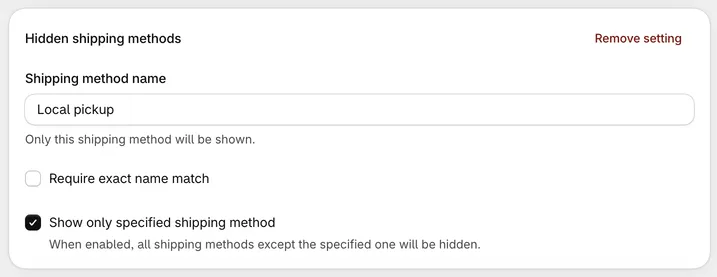
Section titled “Hide shipping method”- Shipping method name: Shipping methods including this name are hidden.
- Require exact name match: Match the whole name instead of part of it.
- Show only specified shipping method: Hides every option except the one you named. With several Show only settings, checkout keeps every option they name (Express and Pickup, say) and hides the rest.
Examples
- Hide “Free Shipping” when the cart weight is more than 30 kg.
- Hide “Express” for addresses in Alaska and Hawaii (Shipping province).
- Show only “USPS” when either address line has a PO Box: in one condition group, Shipping address (line 1) regex and Shipping address (line 2) regex, both
(?i)\bp\.?\s*o\.?\s*box\b. It matches PO BOX, P.O. Box, po box and POBox. - Show only “Local pickup” when the cart contains a product tagged
oversized. - Hide “Standard” when every product in the cart is tagged
freight(Condition set 2, All line items product tags). - Hide “Express” when a variant title in the cart contains
Gallon(Line item variant title, Condition set 1 or 2).
Rename shipping method
Section titled “Rename shipping method”- Shipping method name: The option to rename.
- Require exact name match
- New shipping method name: What customers see instead.
For example, rename “Standard” to “Standard (3–5 business days)”.
Reorder shipping method
Section titled “Reorder shipping method”Works like reordering payment methods: a list of Rank and Name rows, where rank 1 is shown first, plus the same options for unmatched methods and ordering style.
Conditions for shipping functions
Section titled “Conditions for shipping functions”Shipping functions have three condition sets. Choose one when you create the function; it can’t be changed later.
Condition set 1: cart contents, customers, and addresses
- Cart products, Cart total, Cart subtotal
- Cart attribute key and value
- Line item price ends in (for example
.99) - Line item variant title, Line item product title, All line item variant titles, All line item product titles
- Customer has an account, Customer tags
- B2B customer exists / does not exist
- Shipping country, province, city, zip/postal code
- Shipping zip/postal codes (a list of codes)
- Shipping address (line 1) regex, Shipping address (line 2) regex
- Delivery cost
Condition set 2: product tags, types and titles, and quantities
- Line item product tags, All line items product tags (every item has one of the tags, gift cards and add-ons included), Quantity of items with product tags, Line item product type, All line item product types
- Line item variant title, Line item product title, All line item variant titles, All line item product titles
- Cart total, Cart subtotal, Number of line items, Number of items
- A line item subscription exists / does not exist
- Customer tags
- Shipping country, province, city, zip/postal code
Condition set 3: B2B and weight
- Company location metafield, Company metafield
- Shipping province, city, zip/postal code
- Shipping zip/postal codes (a list of codes)
- Delivery cost
- Total cart weight (kg)
See conditions for functions for how each condition matches.
Things to know
Section titled “Things to know”- Address and cost conditions only look at the relevant shipment. In condition sets 1 and 2, conditions like Shipping country and Delivery cost only count shipments that contain an option matching the setting’s shipping method name. This matters when an order ships from more than one location.
- Shipping functions can’t see which option is selected. They decide which options to show before the customer picks one.
- No markets setting. To limit a shipping function to one market, use Shipping country conditions.
- One cart attribute key per function (Condition set 1 only). Only the first key you use is read, and the editor warns under a condition on another key. Cart attribute matching is case-sensitive. includes isn’t offered for cart attributes here, since it never matches: use is equal to or is not equal to.
- Older functions named “… shipping method (by tags)” are the same as Condition set 2. They keep working.