
Shipping discounts
A shipping discount takes money off shipping rates. A 100% shipping discount is free shipping, so this is the type for “free shipping over $50”. It’s applied automatically when its conditions pass. For a free shipping discount code, such as FREESHIP, use a flex discount instead.
Plan: Free (as its one customization), Deals & Rules or Buddy. Works on all Shopify plans. It appears on the Discounts page in Shopify admin, titled with the discount’s Title. Clicking it there opens it in Checkout Buddy.
Common uses:
- Free standard shipping when the cart subtotal is more than $75. Pair it with a progress bar in checkout (Shopify Plus) or on your cart page.
- $5 off express shipping for customers tagged VIP.
- Free shipping when the cart weighs less than 2 kg.
Set up free shipping over $50
Section titled “Set up free shipping over $50”- In Checkout Buddy, open Customizations. On the Discounts tab, click Create customization, then the Discounts card.
- Under Type, choose Shipping. Give it a Title, such as
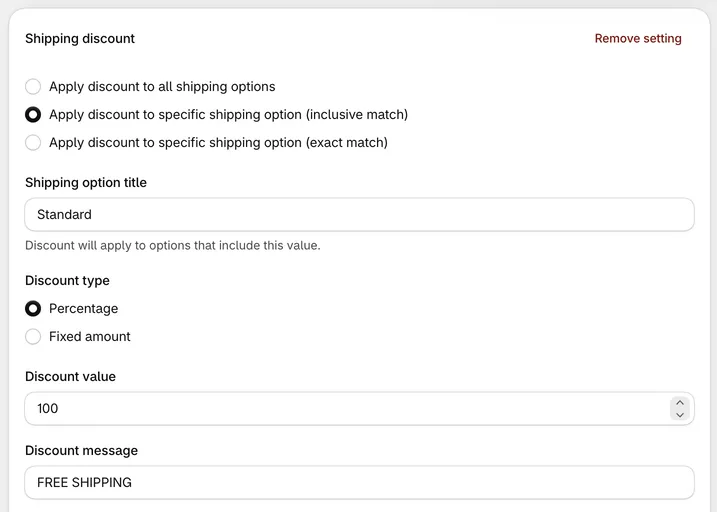
Free shipping over $50. - Keep Apply discount to all shipping options. Set Discount type to Percentage, Discount value to
100and Discount message toFree shipping. - Tick Combines with order discounts and Combines with product discounts, so a customer’s discount code doesn’t cost them free shipping.
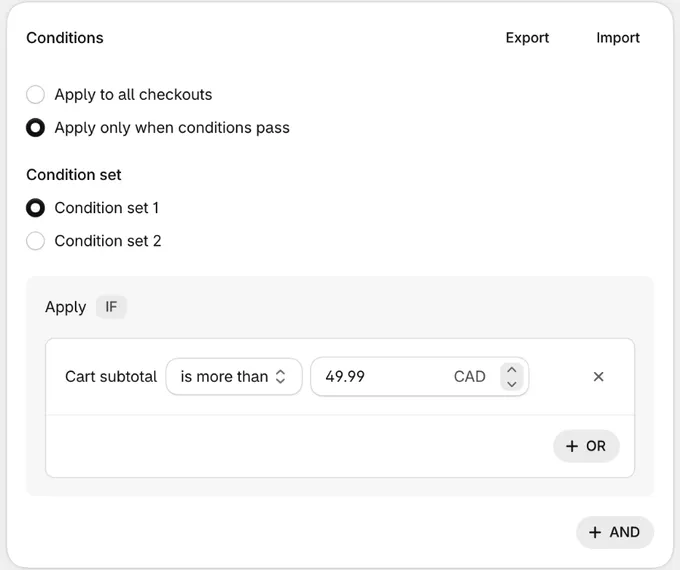
- Under Conditions, choose Apply only when conditions pass, click Add condition and add Cart subtotal is more than
49.99. “Is more than” is strict, so 49.99 gives free shipping from $50. - Click Save. It’s live straight away.
The Free shipping over an amount recipe, under Templates → Discounts, fills all of this in, then adds a progress bar that shows customers how close they are: in checkout on Shopify Plus, or on your cart page and in your cart drawer. See free shipping progress bar.
Settings
Section titled “Settings”Which shipping options are discounted:
| Choice | Discounts |
|---|---|
| Apply discount to all shipping options | Every shipping option (the default) |
| Apply discount to specific shipping option (inclusive match) | Options whose name contains the Shipping option title, ignoring capitals |
| Apply discount to specific shipping option (exact match) | Options whose name is exactly the Shipping option title, including capitals |
| Apply discount to cheapest shipping option | The cheapest paid option in each shipment. Condition set 2 only |
- Shipping option title: The name to match, for the two “specific” choices. Saving needs one.
- Discount type: Percentage or Fixed amount.
- Discount value: The percentage or amount. It has to be above 0, and a percentage can’t be over 100.
100percent is free shipping. - Discount message: The label customers see at checkout. Defaults to
DISCOUNT. - Shipping rate price threshold (Condition set 2 only): Only rates at or above this price get the discount. It doesn’t apply to Apply discount to cheapest shipping option.
- Recurring cycle limit: For subscriptions, how many subscription orders get the discount.
1, the default, is the first order only, and0is every order. Left blank, it saves as1. - Combines with order discounts, Combines with product discounts: Whether the shipping discount can be used together with order and product discounts, such as a customer’s code. Both are off by default. Shopify only combines two discounts when both allow it.
You can add several settings, and every setting whose conditions pass is applied. Start and end dates are under Active dates, and Eligibility limits the discount to the customer segments or markets you pick.
Conditions
Section titled “Conditions”Choose a condition set when you create the discount; it can’t be changed later.
Condition set 1
- Cart total, Cart subtotal, Number of items, Cart products, Quantity of variants
- Line item product tags, All line items product tags (every item has one of the tags)
- A line item subscription exists / does not exist
- Line attribute key, Line attribute key and value
- Cart attribute key and value
- Total cart weight (kg)
- Customer tags, User is a customer, User is authenticated as a customer
- Shipping country
Condition set 2
- Customer metafield, Company metafield
- B2B customer exists / does not exist
- Number of items
Things to know
Section titled “Things to know”- Shipping country takes one country. Enter a single code in capitals, such as
US. For several countries, add one Shipping country condition per country in the same OR group. - Currencies: in Condition set 1, fixed amounts are converted from your store currency to the customer’s currency. In Condition set 2 they aren’t: the same number comes off in every currency, so use a percentage on multi-currency stores. The Shipping rate price threshold is in your store’s currency and is converted for the customer.
- Cheapest option ignores free rates. If a shipment already has a free option, the cheapest paid option is discounted.
- Shipping discounts need a shipping rate to discount. They can’t create a new free shipping option; set up the rate in Settings → Shipping and delivery first.
- Some markets only: choose Specific markets under Eligibility, or use Shipping country conditions. See customer segments and markets.
- Need a shipping discount code? This one is automatic only. Use a flex discount with only Off shipping ticked, or start from the Free shipping code template.
- Shipping discounts don’t combine with other shipping discounts.