
Collection discounts
A collection discount, Amount off collections in the app, takes money off every product in the collections you choose, automatically or with a discount code. It’s the easiest way to run a sale on a category, such as 20% off “Summer”, or 15% off it for customers tagged VIP. It works on every Shopify plan and every Checkout Buddy plan, Free included.
A collection discount gives everyone the same deal. For a lower price the more customers buy from the collection, such as 10% off 2 and 20% off 4, use a volume discount on the collection. For buy 2, get 1 free, use Buy X get Y. For hand-picked products, use a product discount.
Create a collection discount
Section titled “Create a collection discount”-
In Checkout Buddy, open Customizations. On the Discounts tab, click Create customization, then the Discounts card.
-
Under Type, choose Amount off collections. Under Method, choose Automatic discount or Discount code.
-
Give it a Title. For a normal sale, keep Discount type at Percentage (each product) and enter the Discount value, such as
20. -
Under Collections applied to, pick the collections, and click Save.
The discount shows on the Discounts page in Shopify admin, titled with its Title. Clicking it there opens it in Checkout Buddy.
Settings
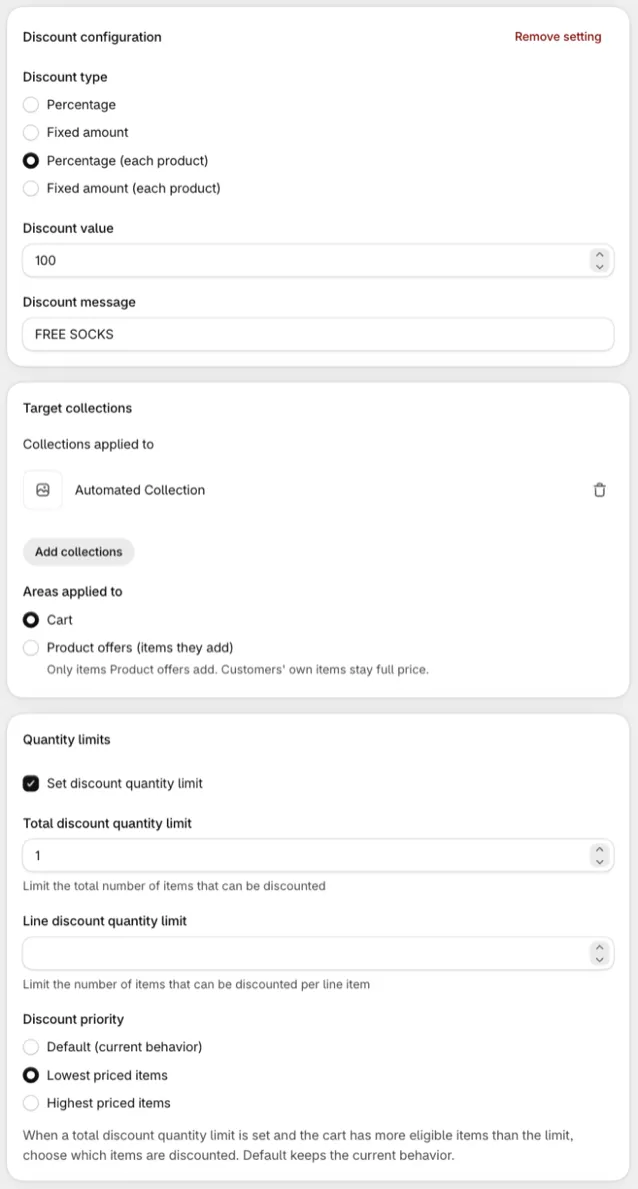
Section titled “Settings”Discount configuration
Section titled “Discount configuration”Discount type decides how the value is spread:
| Discount type | What the customer gets |
|---|---|
| Percentage (each product) | The full percentage off every matching item. 20% means 20% off each one. The default for a new discount. |
| Percentage | The percentage is divided between the matching cart lines, rounded up. 20% with three matching lines gives 7% off each line. |
| Fixed amount (each product) | The amount off every matching item. |
| Fixed amount | The amount off once, shared across all matching items. |
| Fixed price (each product) | Every matching item sells for this price. At $100, a $430 item and a $1,000 item both sell for $100. Items already at or below it keep their price. Converted for other currencies. Condition set 1 only. |
- Discount value: The percentage or amount, or the Price for Fixed price (each product). It has to be above 0, and a percentage can’t be over 100.
- Convert to the customer’s currency (either Fixed amount): the amount is in your store’s currency and converted for other currencies. On for new discounts; older discounts start with it off, see Things to know.
- Discount message: The label customers see at checkout (automatic version only). Defaults to
DISCOUNT.
Target collections
Section titled “Target collections”Collections applied to: A cart line is discounted when its product is in any of these collections. Pick at least one: saving asks for one.
Areas applied to: Which cart lines get the discount. Only on the automatic Collection discount.
- Cart: Every matching cart line, however it got there. This is the default.
- Product offers (items they add): Only matching items a Product offer added. Customers’ own items stay full price. It needs Condition set 1. Line attribute conditions are disabled while it’s chosen, since Product offers uses the discount’s line attribute. Its Offers it covers rows limit it to some offers: see which offers a discount covers.
For gifts buyers choose from a collection, one Collection discount at Percentage (each product) 100, applying to Product offers (items they add), makes every pick free. See gifts from a collection.
Quantity limits
Section titled “Quantity limits”Tick Set discount quantity limit to cap how many items are discounted.
- Total discount quantity limit: The most items discounted across the whole cart.
- Line discount quantity limit: The most items discounted on each cart line.
- Discount priority: When more items qualify than the total quantity limit, choose which get the discount: Default (current behavior), which goes in cart order, Lowest priced items, or Highest priced items.
Each limit is a whole number from 1. Leave one blank for no limit of that kind.
With both limits set, both apply. Each line counts up to its line limit toward the total, in the priority order, and the line where the total runs out gets what’s left. With a line limit of 1 and a total of 5, two lines of 3 items get 1 item discounted each.
With Fixed price (each product), items already at or below the price get nothing, so they don’t use up the total limit.
For example, “one free sock pack per order” is Percentage (each product) 100, a total limit of 1, and Lowest priced items.
Combinations and stacking
Section titled “Combinations and stacking”The same Combines with checkboxes and product discount stacking as product discounts.
Discount code (code version only)
Section titled “Discount code (code version only)”Discount code, Limit to one use per customer, and Apply usage limit → Usage limit.
Markets and schedule
Section titled “Markets and schedule”- Active dates has Set specific start date and Set specific end date.
- Eligibility: All customers, or only Specific customer segments or Specific markets, which Shopify checks itself. See segments and markets.
You can add several settings to one collection discount, for example a different percentage for each collection. Every setting whose conditions pass is applied.
Conditions
Section titled “Conditions”Choose a condition set when you create the discount; it can’t be changed later.
Condition set 1
- Cart total, Cart subtotal, Cart products
- Cart collections, Quantity of items in collections, Total value of items in collections
- Individual product quantity in collection: only lines that meet the quantity themselves are discounted. Good for “buy 3 of the same shirt, get 10% off”. Two of them on the same collection joined by AND, such as is more than 2 and is less than 5, discount only lines that meet both. For several quantity tiers, use a volume discount on the collection.
- Cart attribute key and value
- Customer tags, User is a customer, User is authenticated as a customer, User is not authenticated as a customer
- Line attribute key, Line attribute key and value: only lines that carry the attribute are discounted. Key and value can be is equal to, is not equal to, is more than, is less than or contains: the line’s value has the text in it, capitals included
Condition set 2
- Customer metafield, Company metafield
- Buyer identity email: matches part of the email address, ignoring capitals. For example
@acme.comtargets everyone from one company.
Things to know
Section titled “Things to know”- Discounted prices don’t show inside older blocks. Older Product offers and Checkbox product offer blocks only preview automatic product discounts. The collection discount still applies at checkout. New Product offers show the price text you write.
- Older fixed amounts aren’t converted until you tick it. A fixed amount discount made before Convert to the customer’s currency existed takes off the same number in every currency: $10 off takes ¥10 off in yen. Tick it, unless you typed the amount in one market’s currency on purpose.
- Subscriptions: the code version applies to subscription orders. The automatic version follows Shopify’s default for app discounts.
- Older discounts with a Markets card. Discounts saved with the older Markets card open with those markets ticked under Eligibility → Specific markets, and your next save moves them there. The same checkouts get the discount. The card stays when the discount is for customer segments, or when your store has a B2B or point of sale market: Shopify’s Specific markets don’t reach those buyers (see segments and markets), so the card keeps giving them the discount as before. With both set, a checkout has to pass both.
- Collections are read from Shopify each time checkout runs, so products you add to a collection later are included automatically.