
Checkbox product offer
A checkbox product offer shows a product with a checkbox or switch. Ticking it adds the product to the cart and unticking removes it. It’s ideal for small add-ons such as shipping protection, gift wrapping, or a donation.
Requires: Shopify Plus and the Business plan.
Add offers
Section titled “Add offers”A new block starts with one offer. Click Add another offer to show more products in the same block. With two or more offers you can tick Allow only one product offer to be selected at a time, so choosing one removes the other, for example “Standard” or “Premium” gift wrap.
Each offer has these settings:
Product
Section titled “Product”| Setting | What it does |
|---|---|
| Product | Pick one product. Tick more than one variant to give customers a dropdown. |
| Add quantity | 1, 2, 3, Match the sum of all line item quantities, or Match the number of line items |
| Add free products to cart automatically | Adds the product at the start of checkout if its price is $0, once per checkout visit. Customers can untick it. |
| Setting | What it does |
|---|---|
| Layout style | Checkbox, Switch, Checkbox V2, or Switch V2. A preview shows under the setting. |
| Padding, Corner radius | Spacing and rounded corners for the Switch style |
| Setting | What it does |
|---|---|
| Heading text | A heading above the product (V2 styles only), with Heading text size and Heading text emphasis |
| Custom title | Leave blank to use the product title |
| Custom description | Leave blank to use the product’s description |
| Custom description when checked | Different text once ticked, such as “Your order is protected”. Leave blank to keep the custom description. |
Product details
Section titled “Product details”- Hide price: only if you show the price elsewhere.
- Hide product image
- Hide border (V2 styles)
- Image size (Switch styles)
How it behaves at checkout
Section titled “How it behaves at checkout”- Already in the cart: if the product is already in the cart, from anywhere, the box starts ticked.
- Ticking adds the chosen variant.
- Unticking removes every cart line of that product’s offered variants, including ones the customer added from your store before checkout.
- Changing the variant while ticked swaps the item in the cart.
- Prices show the discounted price when the product has an automatic product discount for checkout components.
Examples
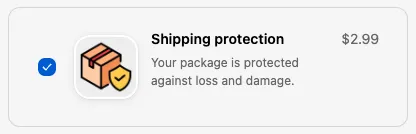
Section titled “Examples”- Shipping protection: a $2.99 “Route protection” product, Switch style, Custom description when checked set to “Your package is protected against loss and damage”.
- Donation: a $1 donation product with Add quantity set to Match the number of line items to donate $1 per item.
- Gift wrap choice: two offers (“Paper wrap” and “Gift box”) with Allow only one product offer to be selected at a time.
- Free sample: a free product with Add free products to cart automatically, which customers can untick.
Things to know
Section titled “Things to know”- Products that can only be bought on a subscription can’t be offered.
- Sold-out variants are hidden. If none are left, the offer doesn’t show.
- Padding, Corner radius, and Hide border are taken from the first offer and apply to the whole block.
- Unticking removes the product even if it was in the cart before checkout. If customers commonly add the product themselves, use an Upsell / Cross sell block instead.