
Block PO boxes
What you’ll build: an error under the address field, “We can’t ship to PO boxes. Please enter a street address.”, that stops checkout until the address is changed.
Requirements: Deals & Rules or Buddy. Works on every Shopify plan.
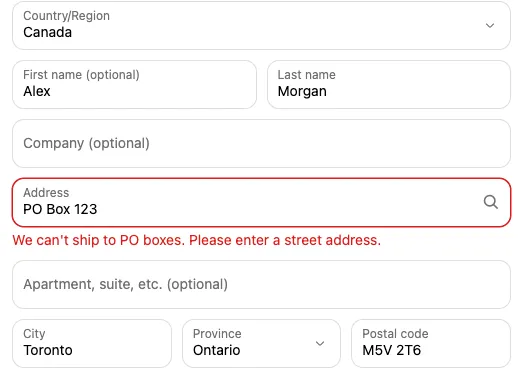
-
In Checkout Buddy, open Customizations. On the Checkout rules tab, click Create customization and choose Address blocker. If you’re asked which one (Shopify Plus stores that installed Checkout Buddy before November 11, 2026), choose Address blocker, marked Function.
-
In the setting:
- Validation type: Exclude PO box
- Error message:
We can't ship to PO boxes. Please enter a street address. - Applicable fields: Address 1 and Address 2 (unit number, suite, etc.)
-
Optional: limit it with conditions, for example Shipping country includes United States, or a Total cart weight (kg) condition for heavy items only.
-
Save. It’s live straight away; there’s nothing to place in the Checkout Editor.
-
Test it with an address like
PO Box 123.
The PO box check catches “PO Box”, “P.O. Box”, “P.O.”, “Post Office Box”, and “PO” as a separate word, in any capitalization.
Function or block?
Section titled “Function or block?”For Shopify Plus stores that installed Checkout Buddy before November 11, 2026, the Address blocker card holds two ways to check addresses. For every other store, it opens the function.
| Address blocker function | Address validator block | |
|---|---|---|
| Who can create one | Every store | Shopify Plus stores that installed before November 11, 2026 |
| Shopify plan | Any | Shopify Plus |
| Checkout Buddy plan | Deals & Rules or Buddy | Free or Buddy |
| Setup | Save and done | Must be placed in the Checkout Editor, with blocking allowed |
| Fields it can check | Shipping address | Shipping address, billing address, email, and contact phone |
If you’re not sure, use the function.
Variations
Section titled “Variations”- Require a house number: add a second setting with Validation type Must include a number on Address 1. It fills in the message “Add your house or building number to the address.” for you.
- Only for some countries: add the condition Shipping country includes the countries.
Troubleshooting
Section titled “Troubleshooting”- A real street is blocked: street names containing the separate word “Po” (such as “Po Street”) also match. Add conditions so it only applies when needed, or use Excluded characters with
PO Box, P.O. Boxinstead for a narrower check. - Nothing happens: the check runs once the customer has finished entering the address and checkout updates, and again when they pay. It doesn’t run on every keystroke. Check the function’s status is enabled.