
Flex discounts
A flex discount gives more than one reward at once, such as 10% off the order plus free shipping. Pick any mix of three rewards: an amount off products, an amount off the order, and free or cheaper shipping. They all apply when the discount’s conditions pass. It can be automatic, or a discount code that gives every reward with one code. With only the shipping reward, it’s also the way to make a free shipping code.
Plan: Deals & Rules or Buddy. Works on all Shopify plans. It appears on the Discounts page in Shopify admin, titled with the discount’s Title. Clicking it there opens it in Checkout Buddy.
Create a flex discount
Section titled “Create a flex discount”These steps make a welcome code: WELCOME gives 10% off the order plus free shipping.
-
In Checkout Buddy, open Customizations. On the Discounts tab, click Create customization, then the Discounts card.
-
Under Type, choose Flex discount (under Several at once). Searching “flex” or “10% off and free shipping” before you click the card opens it with Flex discount chosen.
-
Under Method, choose Discount code, or keep Automatic discount to give the rewards without a code. Give the discount a Title.
-
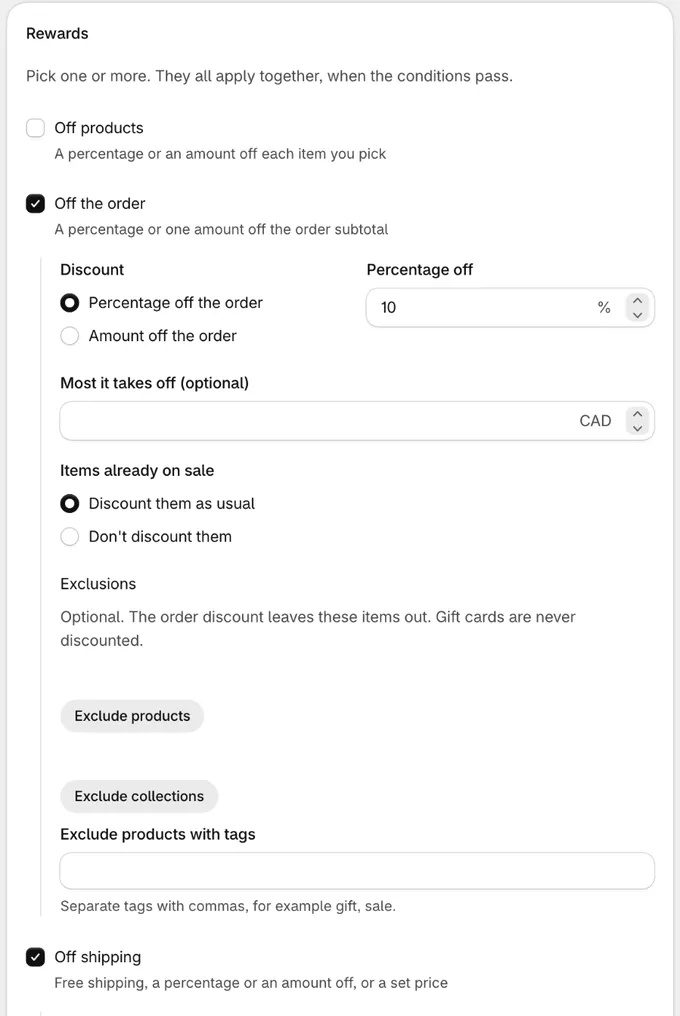
In the Rewards card, keep Off the order and Off shipping ticked. Under Off the order, keep Percentage off the order and enter
10. Under Off shipping, keep Free shipping. -
In the Discount code card, enter the code, such as
WELCOME. -
Click Save in the bar at the top of the page. The discount is live straight away.
For a free shipping code, start from the Free shipping code template, under Templates → Discounts: a code, FREESHIP, with only Off shipping ticked and set to Free shipping. It combines with order and product discounts. Change it to a set price or to some rates only before you save.
Or start from Shopify admin: on the Discounts page, click Create discount and choose Flex discount.
More deals it’s for:
- An influencer or partner code: SARAH15 gives 15% off plus free shipping.
- An automatic deal: 10% off and free shipping when the cart is over $100. It takes one of Shopify’s 25 automatic discount slots instead of two.
- A VIP offer: customers tagged VIP get 20% off a “New arrivals” collection plus free express shipping.
- A shipping code: FREESHIP gives free shipping, or $5 express shipping, with only the shipping reward ticked.
Shopify’s own Discounts page gives one reward per discount or code, so these take two discounts there, or two codes for customers to type.
Settings
Section titled “Settings”Discount
Section titled “Discount”- Type: Flex discount. Click Change to pick another type until you save.
- Method: Automatic discount applies at checkout when the conditions pass. Discount code applies when the customer enters the code.
- Title: Shown on Shopify’s Discounts page, and to customers on an automatic discount if the message is blank. Must be unique among your customizations.
After you save, the type and method can’t change. The rewards can.
Rewards
Section titled “Rewards”Tick one or more: saving needs at least one. A new flex discount starts with Off the order and Off shipping ticked.
Off products
- Items: Specific products, Product tags or Collections, as on a volume discount.
- Discount: Percentage off each item or Amount off each item.
- Limits, all optional: Most it takes off an order, Most items that get it (the cheapest items first) and Items already on sale (Discount them as usual, Don’t discount them or Discount them from the compare-at price). They work as on a volume discount.
Off the order
- Discount: Percentage off the order or Amount off the order.
- Most it takes off (optional, with Percentage off the order): such as 20% off, up to $50. Amount off the order has no cap of its own: the amount is the most it takes off.
- Items already on sale: Discount them as usual, or Don’t discount them to leave them out of the order discount.
- Exclusions (optional): products, collections or product tags the order discount leaves out.
Off shipping
- Discount: Free shipping, Percentage off shipping, Amount off shipping or Set price for shipping. With a set price, Shipping costs is what each discounted rate costs: at 5, a $14.90 rate drops to $5, and a rate of $5 or less stays as it is.
- Only on rates up to (optional): only shipping rates that cost up to this amount are discounted, like Shopify’s “exclude shipping rates over a certain amount”.
- Only rates named (optional): only delivery options whose name contains one of these words, separated by commas, such as
Express, Overnight. Capitals don’t matter. Leave it blank for every rate.
Amounts are in your store’s currency and are converted for customers who pay in another one. Percentages go up to 100.
Message at checkout: Shown next to each reward on an automatic discount, such as Welcome offer. Leave it blank to use the Title. On a discount code, customers see the code.
Discount code
Section titled “Discount code”Only with Discount code.
- Discount code: The code customers enter once to get every reward, such as
WELCOME. - Limit to one use per customer
- Apply usage limit: The number of times the code can be used in total.
Combinations
Section titled “Combinations”Combines with order discounts, Combines with product discounts, Combines with shipping discounts: Whether this discount can be used together with other discounts of each kind. All are off by default. Shopify only combines two discounts when both allow it.
These are about other discounts. A flex discount’s own rewards always apply together.
Conditions
Section titled “Conditions”The same conditions as a volume discount: cart subtotal, cart products and collections, numbers of items, line item product tags, product types and vendors, items on sale, the cart’s currency, customer tags, whether the buyer is a customer, B2B buyers, and POS checkouts and locations. When the conditions don’t pass, no reward applies.
Active dates and Eligibility
Section titled “Active dates and Eligibility”Tick Set specific start date and Set specific end date to schedule the discount. Without an end date, it doesn’t end. In Eligibility, give it to All customers, or only to the customer segments or markets you pick.
Summary
Section titled “Summary”The Summary card shows what the discount does as you fill it in, for example “10% off the order”, “Free shipping on rates up to $25.00” and “Code WELCOME gives every reward”.
How the rewards add up
Section titled “How the rewards add up”- Off products comes off each item it covers.
- Off the order comes off the order subtotal after that, so it’s taken from the already discounted prices.
- Off shipping comes off every delivery option that costs something, or only the ones you limit it to by price or name. Pickup and other free options have nothing to take off.
For example, with 20% off products tagged “snowboard”, 10% off the order and free shipping, a $600 snowboard costs $480 after the products reward, the order reward takes another $48 off, and the $14.90 shipping is free.
Things to know
Section titled “Things to know”- One code, every reward. On a discount code, the customer enters the code once. Shopify still counts it as one discount.
- Rewards can change after saving. Untick a reward or tick another and save; the discount keeps its title, code and dates.
- Some markets only: choose Specific markets under Eligibility. See customer segments and markets.
- Only rates named matches part of a name.
Expresscovers “Express” and “UPS Express Saver”, but not a rate called “Priority”. - Use product tags or collections for big selections. The same limits as a volume discount apply to the products reward, its exclusions and the conditions together: up to 100 different product tags, collections and customer tags, and about 150 variants picked one by one. The page warns you the same way.
- If a discount isn’t applying, work through discount not applying.