
Line item upsell
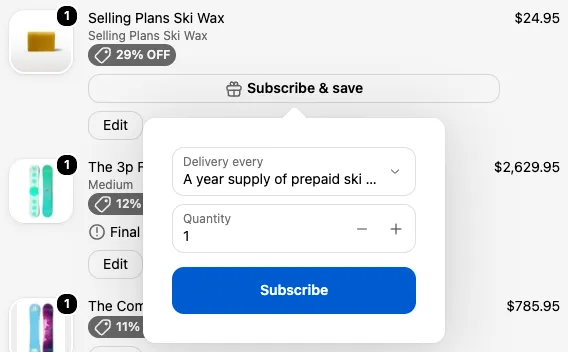
A line item upsell adds a small link, such as “🎁 Subscribe & save”, under a product in the order summary. Clicking it opens a popover where the customer can switch that product to a subscription, or add a product that goes with it.
Requires: Shopify Plus and the Business plan.
Settings
Section titled “Settings”| Setting | What it does |
|---|---|
| Upsell type | Subscription upsell or Complementary add-on (requires Shopify Search & Discovery setup) |
| Text | The link under the product. Defaults to “Subscribe & save”. |
| CTA Text | The button in the popover. Defaults to “Subscribe”. |
| Text appearance | The link color: Base, Accent, Subdued, Info, Success, Warning, Critical, or Decorative |
| Text emphasis | None, Bold, or Italic |
| Icon | An icon before the text |
There’s no product picker. The offer comes from the product it’s shown under.
Subscription upsell
Section titled “Subscription upsell”The popover lists the product’s subscription plans, plus a quantity. Choosing a plan and clicking the button converts that cart item to a subscription. It doesn’t add a new product.
The link only shows under products that have subscription plans and aren’t already on one.
Complementary add-on
Section titled “Complementary add-on”The popover shows the first complementary product you’ve set up for this product in Shopify’s Search & Discovery app, with a variant dropdown if needed. The button adds one of it to the cart.
The link hides when the product has no complementary products, or when one of them is already in the cart.
Place it under line items
Section titled “Place it under line items”It appears under every product it applies to. To limit which products show it, use rules such as Target line item tags. See rules for a specific line item.
Things to know
Section titled “Things to know”- The add-on price in the popover always shows with a
$sign, so this option is best suited to stores that sell in dollars. - Translations entered for this block aren’t used at checkout yet. Write the text in your checkout’s main language.
- Changes are blocked when the checkout doesn’t allow editing items, for example some B2B checkouts.