
Address blocker
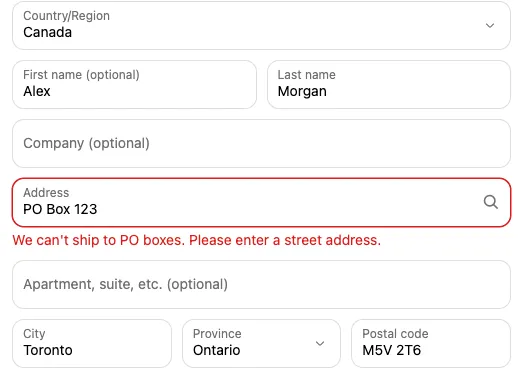
The address blocker checks the shipping address against rules you set and shows an error on the field, stopping checkout until it’s fixed. Use it to block PO boxes, require a house number, keep address lines short enough for your carrier’s labels, or only accept certain postal codes.
Plan: Deals & Rules or Buddy. Works on all Shopify plans. In Shopify admin it appears under Settings → Checkout → Checkout rules.
Set up an address blocker
Section titled “Set up an address blocker”-
In Checkout Buddy, open Customizations. On the Checkout rules tab, click Create customization and choose Address blocker.
-
Pick a Validation type, like Exclude PO box or Must include a number, and fill in its Validation value if it has one.
-
Write the Error message and tick the Applicable fields to check.
-
Click Save. There’s nothing to place in the Checkout Editor: it’s Enabled from its first save.
Settings
Section titled “Settings”Each setting is one validation rule. Add several settings to check several things.
- Validation type: What to check (see below).
- Validation value: The limit, list, or pattern, where the type needs one.
- Error message: What the customer sees.
- Applicable fields: Which shipping address fields to check: Address 1, Address 2 (unit number, suite, etc.), City, Zip/Post code, Phone (shipping address), Country, Province, First name, Last name.
- Show error as general checkout error: Shows the error at the top of checkout, not on a field.
| Validation type | Validation value | Error shows when |
|---|---|---|
| Character limit | A number | The field is longer than this many characters |
| Character minimum | A number | The field has fewer characters. Empty fields pass, so combine with Required |
| Excluded characters | Characters or words, separated by commas | The field contains any of them, ignoring capitals |
| Value match | Allowed values, separated by commas | The field isn’t exactly one of them (capitals count). End a value with * to allow anything starting with it, for example M5V* |
| Custom regex | A regular expression | The field doesn’t match the pattern |
| Required | None | The field is empty |
| Exclude PO box | None | The field looks like a PO box, such as “PO Box 12”, “P.O. 12”, or “Post Office Box 12” |
| Must include a number | None | The field has no number, such as an Address 1 without a house number. Empty fields pass, so combine with Required |
Picking Must include a number on a new setting ticks Address 1 and fills in the message “Add your house or building number to the address.”, if you haven’t set them yet. Change either as you like.
Click Add address blocker for another rule. The Markets card limits the blocker to the markets you tick under Apply to selected markets only.
Conditions
Section titled “Conditions”Add conditions to check addresses only sometimes, for example only for heavy orders or one country.
Total cart weight (kg), Shipping address 1, Shipping address 2, Shipping country, Shipping province, Shipping zip/postal code, Shipping zip/postal codes, Shipping city.
Examples
Section titled “Examples”- No PO boxes in the US: Exclude PO box on Address 1 and Address 2, with the condition Shipping country includes United States.
- House number required: Must include a number on Address 1, with the message “Add your house or building number to the address.”
- Carrier label limit: Character limit
35on Address 1 and Address 2. - Local delivery only: Value match
M5V*, M5J*, M6K*on Zip/Post code. - Latin characters only: Custom regex
^[A-Za-z0-9À-ÿ .,'#/-]*$on Address 1, City, First name, and Last name.
Things to know
Section titled “Things to know”- It runs during checkout. The error appears when the customer continues past the shipping step or tries to pay.
- Only shipping addresses are checked. Digital-only orders aren’t checked. On Shopify Plus stores that installed Checkout Buddy before November 11, 2026, the Address validator block can check the billing address, email or contact phone.
- Custom regex matches anywhere unless you anchor it with
^and$, and it’s case-sensitive. Test patterns at regex101.com using the JavaScript flavor. - Value match on an empty field fails (an empty Address 1 is skipped), so tick only fields customers always fill in, or pair it with conditions.
- “PO” on its own counts as a PO box. A street or name containing the separate word “Po” is also blocked.
- Moving to the Free plan deletes your address blockers. See downgrade to Free.
- For a step-by-step setup, see block PO boxes. If it doesn’t catch an address, see a payment, shipping, or checkout rule isn’t working.