
Content rules
Rules decide who sees a block. Everything in the Content app block uses the same rules, under Who sees it: content blocks, and the progress bars, Reviews, What happens next and automations made since the Content block. For an automation, the rules decide when it acts.
Blocks made before the Content block, and functions, use conditions instead.
Add rules
Section titled “Add rules”Under Who sees it, choose Every checkout, or Only checkouts that match the rules. Then click Add condition and pick one from the list, by group or with Search conditions. Each condition has its options on its row, such as which amount to compare.
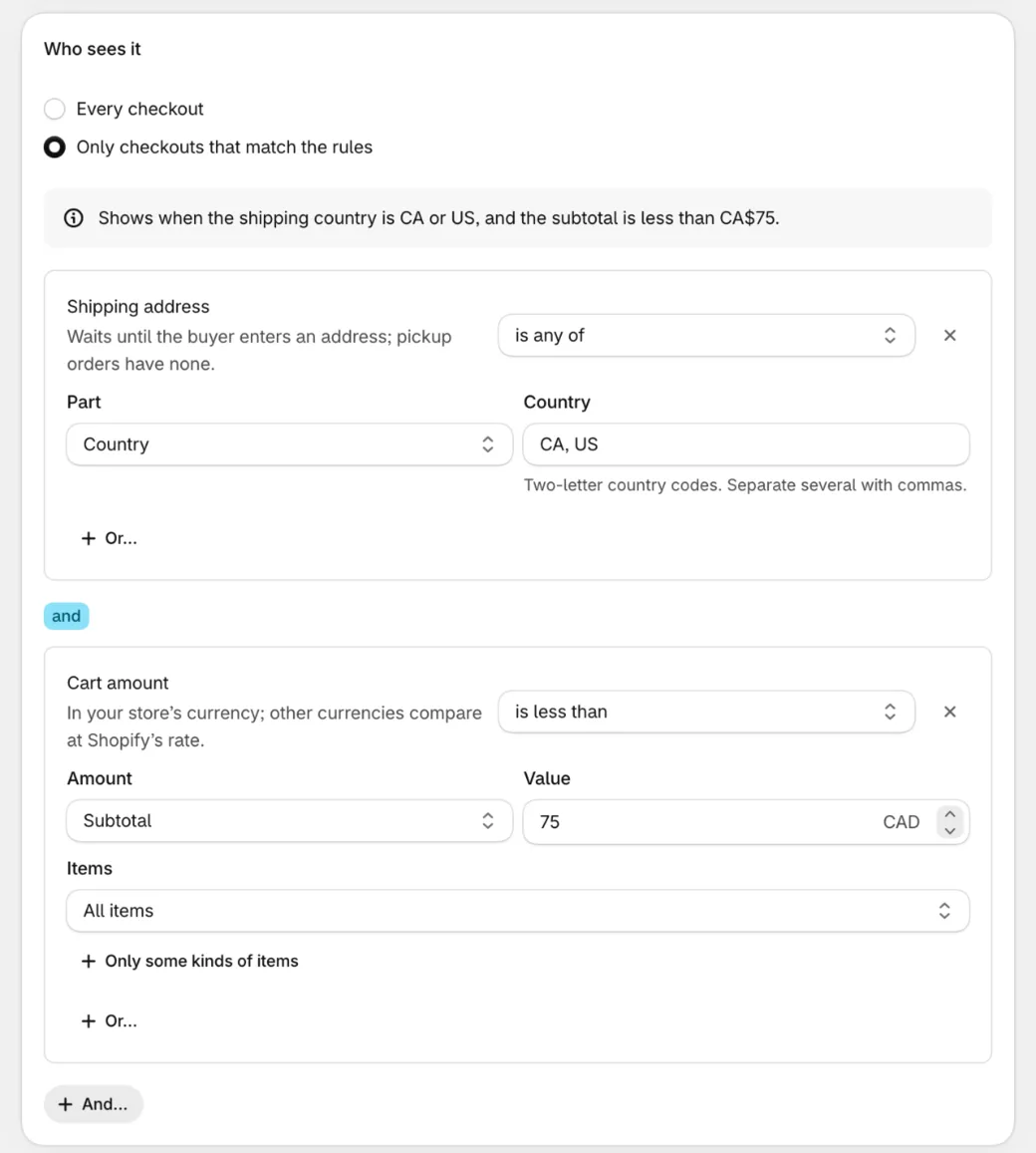
A line above the rules sums them up in words, such as “Shows when the shipping country is US.” Read it to check the block does what you mean.
And, or
Section titled “And, or”Conditions sit in boxes:
- Or… adds a condition to the same box. Any condition in the box can pass.
- And… starts a new box. Every box has to pass.
For example, a free shipping message for buyers in Canada or the US whose subtotal is under $75:
Shipping address · Country · is any of · CA, USandCart amount · Subtotal · is less than · 75| Buyer | First box | Second box | Block shows? |
|---|---|---|---|
| Canada, $50 subtotal | passes | passes | Yes |
| US, $90 subtotal | passes | fails | No |
| UK, $50 subtotal | fails | passes | No |
Rules always take the shape (A or B) and (C or D). For (A and B) or (C and D), make two blocks, one for each side.
The conditions
Section titled “The conditions”| Condition | What it checks |
|---|---|
| Cart amount | Subtotal, Total, Tax, Cart discounts or Paid by gift cards, compared with an amount: is more than, is at least, is less than, is at most, is exactly or is not. Subtotal and Total can count All items, Only these items or Leave out these items, by product, collection or tag, and Only some kinds of items: not free, free, one-time purchases, subscriptions, not bundles, added by Checkout Buddy or not, or the first line of each product. |
| Number of items | Items (each unit), Lines or Different products, with the same choice of items. Each product on its own compares each line’s quantity instead of the total. One match is enough: “2 or more of any one product”. |
| An item in the cart | Any item, Every item or No item, among the items In the cart, Of these products, in the cart, or These variants, in the cart or not, then what to compare: Product or variant, Collection, Product type, Vendor, Product tag, Product title, Variant title, SKU, Line price, Compare-at price, On sale, Quantity, Discount, Line item property, Product metafield, Variant metafield, Subscription, Available for sale, On backorder, Bundle component title or SKU, Added by Checkout Buddy, or Its product is on another line too. The comparison is next to the condition’s name, such as matches any of: it lists only the comparisons the field you picked takes, and picking another field moves it to one that fits. Add each product type or vendor on its own, so a name with a comma like Acme, Inc. stays one name. |
| Cart weight | Each item’s shipping weight times its quantity, in kg, lb, g or oz |
| Sale items | In the cart or not in the cart: the items’ compare-at prices add up to more than the subtotal |
| Cart attribute | An answer saved by a form, an automation or another app, by its Key: is, contains, has a value, is empty, is more than and the like (numbers compare as numbers), or is a date within the next so many Days (today counts; the attribute holds a date like 2026-12-24). Leave Key empty to check every attribute. |
| Order note | Has text, is empty, contains or doesn’t contain |
Discounts
Section titled “Discounts”| Condition | What it checks |
|---|---|
| Discount code | Codes the buyer entered: is any of, is none of, contains, any code is used, no code is used, or the number of codes used, optionally Only codes containing some text. Checkout drops codes that don’t exist in Shopify. |
| Discount applied | Any discount, no discount, or one whose code or title contains your text: a code, or an automatic discount on the order or an item |
| Gift cards used | How many gift cards the buyer used |
Customer
Section titled “Customer”| Condition | What it checks |
|---|---|
| Customer | Is or isn’t Logged in, A guest, On their first order or A returning customer, or has more than, at least, fewer than or exactly a number of Orders before this one. First order and returning customer need a logged-in buyer. |
| Marketing | Accepts or doesn’t accept Email or SMS marketing, Email marketing or SMS marketing: what a logged-in buyer agreed to receive |
| Phone number | The buyer’s phone or The shipping address phone is given or isn’t given |
The buyer’s email contains, is, is given and the like. Separate several with commas: any of them matches, such as @yourcompany.com, @partner.com. |
|
| Customer metafield | The logged-in customer’s custom.field or custom.field_2 metafield: is, contains, has a value, is empty, or more or less than a number. Checkout can read only these two (a Shopify limit). Empty for guests. Fill them with Shopify Flow, by hand or with another app, for example a VIP tier. |
| B2B | Is a B2B buyer, isn’t a B2B buyer, or the company or location is any of the ones you pick |
| Company metafield | The B2B buyer’s company’s custom.field or custom.field_2 metafield, only these two (a Shopify limit). Empty for other buyers. |
Shopify doesn’t let checkout read customer tags. To sort buyers, use a customer metafield.
Delivery
Section titled “Delivery”| Condition | What it checks |
|---|---|
| Shipping address | A Part of the address: Country, Province or state (two-letter codes, such as CA, US or ON, QC, NY), City (accents, capitals and dashes don’t matter), Postal code, Address line 1, Address line 2, Company, or First name is the last name. Compare with is any of, is none of, starts with any of, contains, is filled in and the like: the list next to the condition’s name shows only the ones the part you picked takes. |
| Billing address | Country, Province or state or Company |
| Delivery method | Shipping, Local delivery, Pickup in store or Pickup point: the kind the buyer has picked so far |
| Shipping method | The name of the method the buyer picked: name contains, name is and the like. Accents and capitals don’t matter. |
Postal codes: with is any of, end a code with * to match its start, so 90* matches 90210. With starts with any of, the start is enough: 90 matches 90210. Spaces and dashes don’t matter.
Payment
Section titled “Payment”| Condition | What it checks |
|---|---|
| Payment method | The kind of payment the buyer picked: Credit card, Wallet (Shop Pay, Apple Pay, PayPal…), Gift card or store credit, Cash on delivery, Manual payment (bank deposit, money order), Pay later (payment terms), Local payment method, Offsite payment, Custom payment method or Other |
| Condition | What it checks |
|---|---|
| Language | The buyer’s checkout language, by code. fr also matches fr-CA. |
| Country | The country checkout prices for, by two-letter code. It follows the shipping address. |
| Market | The buyer’s market, picked from your markets. It follows the shipping country. For a market inside another, tick both. |
| Date | Is between, is on or after, is on or before, is on or is not on the days you pick, in your store’s time zone. The days you pick are included. |
| Day and time | Is during or is outside the weekdays and hours you pick, in your store’s time zone. An end before the start runs past midnight, such as 10 PM to 6 AM. |
Under each item, shipping method or pickup location
Section titled “Under each item, shipping method or pickup location”These only pass in a Content app block under each item, shipping method or pickup location. Anywhere else they never match, and the block’s editor reminds you.
| Condition | What it checks |
|---|---|
| This item | The item the block sits under, with the same choices as An item in the cart: its product, tag, SKU, price, a metafield and so on |
| This shipping method | The method the block sits under: its name contains or name is your text, or it is the one chosen |
| This pickup location | The location the block sits under: its name (the location’s, or its option’s), or it is the one chosen |
| Condition | What it checks |
|---|---|
| Blocks the buyer has seen | Other Checkout Buddy blocks that have shown in this checkout, by ID: include any of or include none of |
How rules are checked
Section titled “How rules are checked”- Live. Rules are checked again whenever checkout changes: items, amounts, discount codes, the address, delivery, payment, cart attributes and the order note. A block appears or goes away while the buyer is on the page, without a reload.
- On the minute. A Date or Day and time rule changes the block at its minute, even if the buyer does nothing: an “Order by 2 PM” banner goes away at 2:00.
- In your store’s time zone. Dates and times use your store’s time zone wherever the buyer is. It’s saved with the block: if you change it in Shopify, save your blocks again.
- Money in the buyer’s currency. Type amounts in your store’s currency. Buyers paying in another currency are compared at Shopify’s rate, the same rate your discounts use, so one block covers every currency. B2B buyers are compared as typed, because company prices can’t be looked up by country.
- Numbers as numbers. A cart attribute of
10is more than9. Text ignores capitals:VIPmatchesvip. - “Has a value” needs a value. An attribute or property that’s there but empty doesn’t count.
- “Every item” fails on an empty cart.
When checkout doesn’t know yet
Section titled “When checkout doesn’t know yet”A rule about something checkout doesn’t know yet waits, and the block stays hidden until it knows. So nothing shows and then vanishes.
- No shipping address yet. A Shipping address rule waits until the buyer enters one. For example, “Country is none of US” doesn’t show a block before there’s an address. A pickup order has no address, which counts as known.
- No billing address yet.
- Product tags, collections, stock and metafields load from your store when a rule needs them. Each item waits for its own, so an item that decides doesn’t wait for one still loading.
- The currency rate, for buyers paying in another currency.
- A market or country checkout doesn’t report.
Payment method rules are the exception: before the buyer picks one, nothing is chosen, so “is none of Cash on delivery” passes.
An automation acts only when its rules surely pass, and undoes only when they surely fail. While checkout is still loading, it does nothing.
In Shopify’s checkout editor, the Content app block shows a note only you see when blocks are hidden because their rules don’t match the editor’s preview checkout.
Examples
Section titled “Examples”| You want | Rule |
|---|---|
| A free shipping nudge under $75 | Cart amount · Subtotal · is less than · 75, with {{ toMoney(remaining(75)) }} in the text |
| A pre-order notice | An item in the cart · Any item · In the cart · Product tag · matches any of · preorder |
| “Order by 2 PM, ships today” | Day and time · is during · Monday to Friday, 12 AM to 2 PM |
| A fee note for cash on delivery | Payment method · is any of · Cash on delivery, with the block before or after the payment methods |
| A note under the Express shipping method only | This shipping method · name is · Express, with the block under each shipping method |
| A message for VIP customers | Customer metafield · custom.field · is · VIP |
| A wholesale notice | B2B · is a B2B buyer |
| A holiday deadline | Date · is between · November 1 and December 15 |
Coming from older conditions
Section titled “Coming from older conditions”Blocks made before the Content block have conditions, over 120 of them. Content rules group them into about 30, with the old variations as options on the row. A few to find:
| Older condition | Content rule |
|---|---|
| Cart total, Cart subtotal | Cart amount → Total or Subtotal |
| Cart total excluding selected variants, or line item tags | Cart amount → Leave out these items |
| Quantity of items with product tags | Number of items → Only these items, by tag |
| Line item tags, Cart products, Cart collections | An item in the cart → Product tag, Product or variant, Collection |
| Target line item conditions | This item |
| Target shipping method title | This shipping method |
| Selected shipping method title | Shipping method |
| Selected delivery option type | Delivery method |
| Selected payment option type | Payment method |
| Customer account exists | Customer → Logged in |
Customer metafield checkout_buddy.field |
Customer metafield, which reads custom.field or custom.field_2 only |
| Date, Day, Time | Date, Day and time, in your store’s time zone |
| Block IDs | Blocks the buyer has seen |
| The Markets setting | Market |
| The devices setting on Image blocks | Show on, in the block’s Look |
There’s no Export or Import on Who sees it. To reuse a block’s rules, Duplicate the block and change its parts.