
Reviews
The Reviews block shows one or more customer reviews that you type in. It’s a simple way to add social proof near the payment step.
Available on the Free and Business plans. Needs Shopify Plus. Checkout only.
Settings
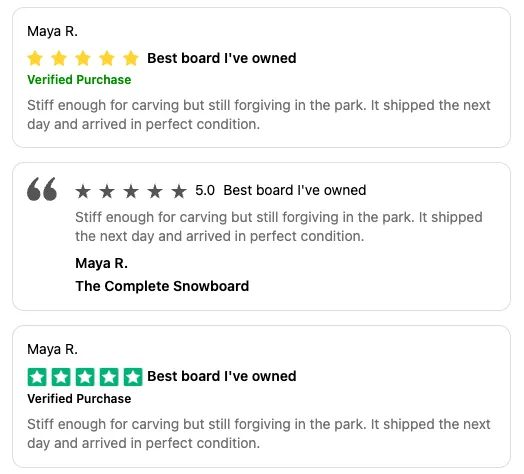
Section titled “Settings”UI version chooses the style:
| Style | Looks like |
|---|---|
| A (default) | Author, stars, bold title, a green verification label, and the review. Can be collapsible. |
| B | A quote mark, stars, the numeric rating (for example 4.5), title, review, then the author and subject. |
| C | Author, stars on green squares, title, the verification label, then the review. |
Reviews are collapsible/expandable (style A only) hides the review text until the customer expands the review.
Each review has:
| Setting | What it does |
|---|---|
| Star rating | 0.5 to 5, in half-star steps. Default 5. |
| Star color | Yellow (default) or Green. Style A only; B uses a fixed color and C is always green. |
| Review title | Shown in bold. |
| Review content | The review itself. |
| Review author | The reviewer’s name. |
| Review subject | Optional, such as the product reviewed. Shown in style B only. |
| Verification label | Optional. Default “Verified Purchase”. Shown in styles A and C. |
Click Add field to add more reviews.
Show one review at a time
Section titled “Show one review at a time”Turn on Enable pagination on the app block in the Checkout Editor. The block then shows one review with arrows to move between them.
Things to know
Section titled “Things to know”- Review text is plain text. Links, formatting, and variables aren’t supported.
- Only use genuine reviews from real customers.
- Choose a star rating of at least 0.5.