
Live values in text
Text in a content block can show values from the buyer’s checkout, such as “Spend $12.50 more for free shipping” or “Welcome back, Alex”. Put the value between double curly brackets, {{ }}. Everything else shows as you wrote it.
Spend {{ toMoney(remaining(75)) }} more for free shipping.Live values work in a Text part’s heading and text, a banner’s title and text, benefits, FAQ questions and answers, button text and the text in a Show more text window. They also work in an automation’s message, and in the heading and intro of What happens next.
Blocks made before the Content block use dynamic text, which works the same way with a smaller set of values.
Insert value
Section titled “Insert value”Click Insert value above a text field to add a common value where the cursor is:
| Choice | Writes | Shows, for example |
|---|---|---|
| Cart total | {{ toMoney(orderTotal) }} |
$84.50 |
| Subtotal | {{ toMoney(orderSubtotal) }} |
$75.00 |
| Items in cart | {{ itemCount }} |
3 |
| Amount left to reach… | {{ toMoney(remaining(75)) }}, with the amount you type |
$12.50 |
| Shipping method | {{ shippingMethod }} |
Standard |
| Customer’s first name | {{ firstName }} |
Alex |
| Discount codes | {{ discountCodes.join(', ') }} |
WELCOME10 |
| Ships by date | {{ formatDate(daysFromNow(2)) }} |
Nov 13, 2026 |
| Shop name | {{ shopName }} |
Your store’s name |
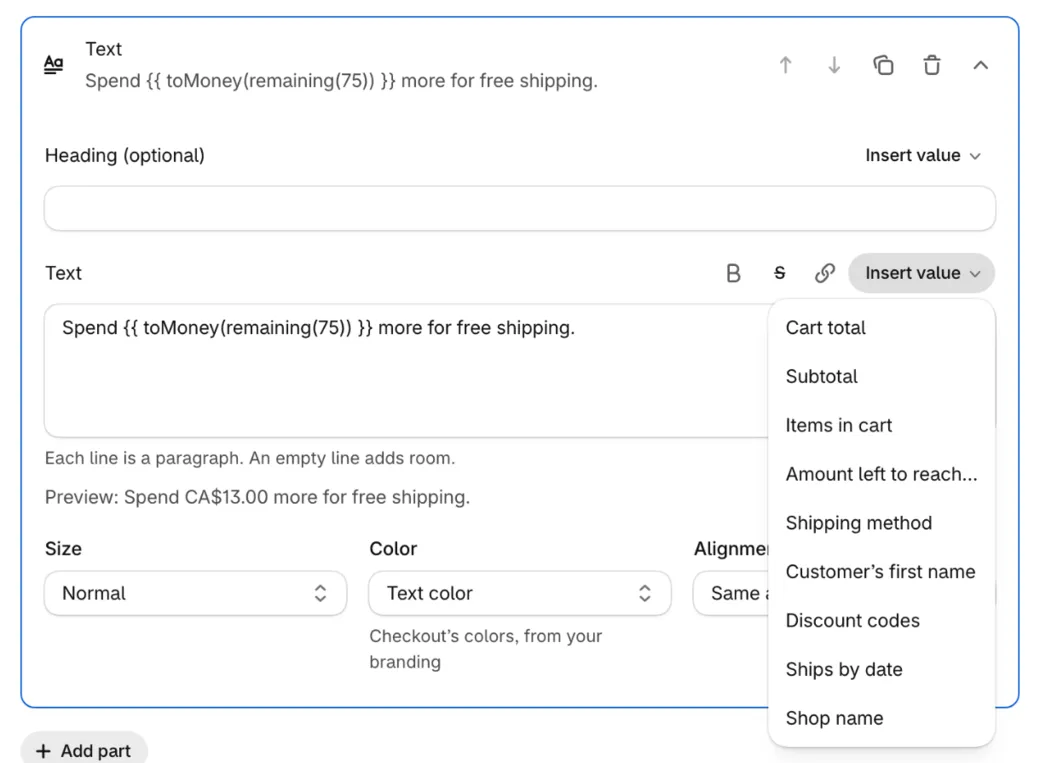
Under the field, Preview shows the text with a sample cart’s values filled in. If a value can’t work, a red line says why, such as a typo in its name, and that checkout shows nothing there. The block’s Preview card shows the formatting too.
Amount left to a goal
Section titled “Amount left to a goal”remaining(1000) is how much more the buyer needs to spend to reach 1,000, and reached(1000) is whether they have:
Spend {{ toMoney(remaining(1000)) }} more for free shipping.- Type the goal in your store’s currency. Buyers paying in another currency see it converted at Shopify’s rate, the same rate your discounts use. A store in CAD with a goal of 1000 shows a US buyer the amount left in US dollars.
- It counts the subtotal: items after their discounts, before shipping and taxes.
- Once the goal is reached,
remainingis 0.
To change the words once the goal is reached:
{{ reached(75) ? 'You get free shipping!' : 'Spend ' + toMoney(remaining(75)) + ' more for free shipping.' }}Or make two blocks with Cart amount rules, one under 75 and one at 75 or more. For a bar that fills up, use a progress bar.
Values
Section titled “Values”What’s between {{ }} is a small piece of JavaScript, so you can do math and choose between words. Names are case-sensitive: orderTotal, not ordertotal.
The cart
Section titled “The cart”| Value | What it is |
|---|---|
orderTotal |
What the buyer pays, with shipping and taxes once checkout knows them |
orderSubtotal |
Items after their discounts, before shipping and taxes |
itemCount |
Every item in the cart, by quantity |
remaining(75), reached(75) |
The amount left to 75 in your store’s currency, and whether it’s reached. See above. |
totalDiscountAmount |
All discounts on the order: order, shipping, product and codes |
discountAllocationsAmount |
Order and shipping discounts and codes, without product discounts |
cartCompareAtPrice |
The cart at compare-at prices (the price where there’s none), times quantity |
totalWeight |
The cart’s weight in kilograms, to two decimals |
discountCodes |
The codes the buyer entered, as a list |
attributes |
The cart’s attributes, by key: attributes["Delivery date"] |
note |
The order note |
lines |
Every item in the cart, with the same values as line under each item |
currencyCode |
The buyer’s checkout currency, such as CAD |
The buyer and delivery
Section titled “The buyer and delivery”| Value | What it is |
|---|---|
firstName |
The logged-in customer’s first name, or the one on the shipping address |
isLoggedIn |
Whether the buyer is logged in |
companyName |
A B2B buyer’s company |
customer.metafields.custom.field, customer.metafields.custom.field_2 |
The logged-in customer’s two metafields checkout can read |
shippingMethod |
The name of the shipping method the buyer picked |
deliveryMethod |
shipping, local delivery, pickup or pickup point |
shippingCountry, shippingCity |
From the shipping address. The country is a two-letter code, such as US. |
selectedDeliveryOptionLowerEstimate, selectedDeliveryOptionUpperEstimate |
The picked shipping method’s delivery estimate, in whole days |
selectedDeliveryOptionDescription |
The picked shipping method’s description |
language, country |
The buyer’s language and country codes, such as fr and CA |
shopName |
Your store’s name |
| Value | What it is |
|---|---|
today |
Today’s date in your store’s time zone, as 2026-11-11 |
daysFromNow(2) |
The date 2 calendar days from today |
formatDate(…) |
A date in the buyer’s language, such as Nov 13, 2026 |
Order today and it ships by {{ formatDate(daysFromNow(2)) }}.Arrives by {{ formatDate(daysFromNow(5), { weekday: 'long', month: 'long', day: 'numeric' }) }}.The second line reads “Arrives by Monday, November 16”. daysFromNow counts every day, weekends included. For dates that follow your shipping days and each shipping method’s estimate, use What happens next.
Under each item, shipping method or pickup location
Section titled “Under each item, shipping method or pickup location”A block placed under each item, shipping method or pickup location knows the one it sits under:
| Value | Where | What it is |
|---|---|---|
line |
Under each item | The item: line.title, line.variantTitle, line.sku, line.quantity, line.total, line.price, line.compareAtPrice, line.discountAmount, line.productType, line.vendor, line.isSubscription, line.attributes (its line item properties), line.product.metafields, line.variant.metafields |
lineQuantity, lineTotalAmount, price, compareAtPrice, variantSku |
Under each item | The item’s quantity, total, unit price, unit compare-at price and SKU |
shippingOption |
Under each shipping method | The method: .title, .description, .cost, .isFree, .lowerEstimate, .upperEstimate (days), .carrier, .isSelected. On its own it shows the title. |
pickupLocation |
Under each pickup location | The location: .name, .address, .city, .isSelected. On its own it shows the name. |
Elsewhere, shippingOption and pickupLocation are the ones the buyer picked.
You save {{ toMoney((compareAtPrice - price) * lineQuantity) }} on this item.Open {{ pickupLocation.name }}: Monday to Friday, 9 AM to 6 PM.Product and variant metafields
Section titled “Product and variant metafields”Show a metafield of an item’s product or variant, here the item the block sits under:
{{ line.product.metafields.custom?.care_instructions }}In a block elsewhere, use lines[0] for the first item. The metafield needs a definition with Storefront API access turned on, in Shopify admin under Settings → Custom data. Put a key with a hyphen in brackets: custom?.["size-chart"]. Metafields load only when a text uses them, and the ?. keeps the text working until they have.
toMoney
Section titled “toMoney”toMoney(amount) writes an amount as money in the buyer’s currency and language, such as $12.50 or 12,50 €. toMoney(amount, 'EUR') writes it in another currency.
Formatting
Section titled “Formatting”Multi-line text fields have buttons for Bold, Strikethrough and Link, which write these marks around the words you select:
| Type this | You get |
|---|---|
**Free returns** |
Bold text |
~~$49.99~~ |
Text with a line through it, for old prices |
[Returns policy](https://example.com/returns) |
A link that opens in a new tab |
[Size guide]@(https://example.com/size-guide) |
A link that opens in the same tab, leaving checkout |
Each line is a paragraph, and an empty line adds room. Marks can go inside each other: **[bold link](https://example.com)**. A value can write marks too: {{ reached(75) ? '**Free shipping unlocked**' : '' }}.
Links open web pages, email (mailto:), phone (tel:) and text messages (sms:). Inside a link’s address, {Gift card number} is replaced with the cart attribute of that name.
Headings, banner titles, benefit titles, FAQ questions and button text are one line: values work there, but formatting marks show as typed.
The marks older blocks used still work: {@red …}, {@boldRed …}, {@subdued …}, {@strikethrough …}, {@small …}, {@discountTag 20% OFF} and {@discountIcon}. Tooltips, [terms]<Ships in 2 days> and {@!tooltip …}, open on a tap, because Shopify’s tooltips don’t work on phones. {@large …} and {@extraLarge …} show at normal size: checkout text comes in small and normal only.
When a value shows nothing
Section titled “When a value shows nothing”- A value that fails shows nothing, such as a typo in its name, and the rest of the text still shows. The editor’s red line tells you before you save.
- A line whose values all show nothing is left out, so a line like
{{ variantSku }}disappears for items without a SKU. true,false,undefinedandnullshow nothing.0shows as 0.- A value checkout doesn’t know yet shows nothing until it does, such as the amount left while the currency rate loads, or a metafield while it loads.
Coming from older blocks
Section titled “Coming from older blocks”{{ }} is still JavaScript, and the names older blocks used keep their meaning, so most text copied from an older block works as it is. What’s different:
toMoneyuses the buyer’s currency on its own.toMoney(orderSubtotal)is enough;toMoney(orderSubtotal, currencyCode)still works.- Customer metafields are
custom.fieldandcustom.field_2. Content blocks don’t readcheckout_buddy.field. lineshas every item’s details, not only its metafields.- New values:
remaining,reached,itemCount,discountCodes,attributes,note,shippingMethod,firstName,today,daysFromNow,formatDate,shippingOption,pickupLocationand more. - A value can run over several lines, and a quote or line break in the buyer’s order note no longer breaks other values.
- Marks can go inside each other, and tooltips open on a tap.