
SMS consent
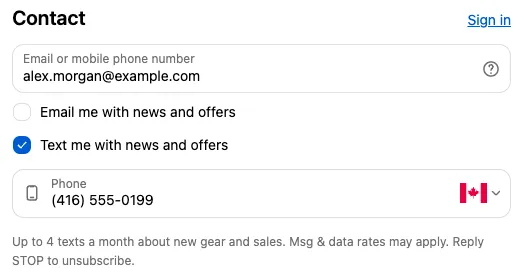
The SMS consent fields block adds a “Text me with news and offers” checkbox. When the customer ticks it, a phone field appears. The consent and number are saved to the customer’s profile in Shopify, the same way Shopify’s own SMS consent option works.
Available on the Free and Business plans. Needs Shopify Plus.
Settings
Section titled “Settings”| Setting | What it does |
|---|---|
| Checkbox label | Default “Text me with news and offers”. Supports links, which show just below the checkbox. |
| Phone field label | Default “Phone”. |
| Additional text | Small print shown under the phone field once the box is ticked, such as message frequency and how to opt out. Supports links. |
| Record consent as checkout attribute too | Also saves true or false on the order, under the block Name as the key. |
| Check by default | Starts with the box ticked. Check your local marketing laws first; many require an unticked box. |
Things to know
Section titled “Things to know”- Consent is only recorded when the customer ticks the box and enters a number in this block’s phone field.
- Consent is saved through Shopify’s own customer marketing consent, so it shows on the customer’s profile in Shopify admin.
- The label and additional text can’t be translated at the moment. For stores with several languages, create one block per language and use each block’s Markets setting.
- If you also turn on Shopify’s own SMS marketing option in Settings → Checkout, customers may see two checkboxes. Use one or the other.