
Line item text
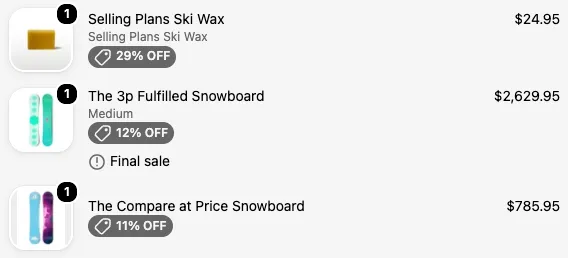
Line item text shows a short line of text under each item in the order summary. Because it knows which item it’s under, it can show that item’s SKU, prices, line item properties, and product or variant metafields.
Available on the Business plan. Needs Shopify Plus. Also works on the thank you and order status pages.
Set it up
Section titled “Set it up”-
Create a Line item text block and fill in Text, the only setting.
-
Use display rules to choose which items it appears under. The Target line item rules check the item the text sits under. See target line item rules.
-
In the Checkout Editor, add a Checkout Buddy app block to the cart line item spot, under the items in the order summary, and set its Fixed block ID. See the Checkout Editor.
Variables
Section titled “Variables”The text supports dynamic text. Line item text has its own set of variables:
| Available | Value |
|---|---|
price |
The item’s unit price |
compareAtPrice |
The item’s unit compare-at price, if it has one |
lineQuantity |
The item’s quantity |
lineTotalAmount |
The item’s line total |
variantSku |
The variant’s SKU |
line |
The item’s properties (line.attributes) and metafields (line.product.metafields, line.variant.metafields) |
cartCompareAtPrice |
The whole cart at compare-at prices |
currencyCode, toMoney() |
For formatting money |
customer |
The logged-in customer’s checkout_buddy.field metafield |
Not available here: orderTotal, orderSubtotal, lines, totalDiscountAmount, the delivery estimate variables, and checkoutNotes. Use a Text block if you need those.
See variables for details.
Examples
Section titled “Examples”Discount badge on sale items
{@discountTag {{ Math.round((compareAtPrice - price) / compareAtPrice * 100) }}% OFF}Add the display rule Target line item compare-at price greater than price so the badge only shows on items that are actually on sale.
How much the customer saves on this item
You save {{ toMoney((compareAtPrice - price) * lineQuantity, currencyCode) }}Original price, struck through
Was {@strikethrough {{ toMoney(compareAtPrice, currencyCode) }}}Final sale warning with a tooltip
{@!tooltip This item can't be returned or exchanged.} Final salePair it with Target line item tags includes final-sale.
A product metafield
Ships in {{ line.product.metafields.custom.lead_time }}A line item property
Engraving: {{ line.attributes["Engraving"] }}Things to know
Section titled “Things to know”- Write one metafield per line of text. Namespace and key names can only use letters, numbers, and underscores.
- Guard against empty values so customers don’t see blank or odd text:
{{ compareAtPrice ? 'On sale' : '' }}. - Show the text only under certain items with Target line item rules. Cart-wide rules like Line item tags check the whole cart, so the text would show under every item.
- On the thank you and order status pages, prices, compare-at prices, and
currencyCodearen’t available.